1
2
3
4
5
6
7
8
9
10
11
12
13
| >> x=7
x =
7
>> x+3
ans =
10
>>
|
1
2
3
4
5
6
7
8
9
10
11
12
13
14
15
16
17
18
19
20
21
| >> 1/3
ans =
0.3333
>> format short
>> 1/3
ans =
0.3333
>> format long
>> 1/3
ans =
0.333333333333333
>>
|
1
2
3
4
5
6
7
8
9
10
11
| >> x
x =
7
>> clear x
>> x
函数或变量 'x' 无法识别。
>>
|
1
2
3
4
5
6
7
8
9
10
11
12
13
14
15
16
17
18
19
20
21
22
23
24
25
26
27
28
|
>> x3=3
x3 =
3
>>
>> clear x*
>> x3=3
x3 =
3
>> who
您的变量为:
ans x3
>> whos
Name Size Bytes Class Attributes
ans 1x1 8 double
x3 1x1 8 double
>>
|
1
2
3
4
5
6
7
8
9
10
11
12
13
14
15
16
17
18
19
20
21
22
23
24
25
26
27
28
29
30
31
| >> pi
ans =
3.141592653589793
>> format short
>> pi
ans =
3.1416
>> inf
ans =
Inf
>> nan
ans =
NaN
>> i
ans =
0.0000 + 1.0000i
|
1
2
3
4
5
6
7
8
9
10
11
12
13
14
15
16
17
18
19
20
21
22
23
24
25
26
27
28
29
30
31
| >> 2>3
ans =
logical
0
>> 3>2
ans =
logical
1
>> 2>2
ans =
logical
0
>> 2>=2
ans =
logical
1
|
1
2
3
4
5
6
7
8
9
10
11
12
13
14
15
16
17
18
19
20
21
22
23
24
25
26
27
28
29
30
31
| >> sin(3.14)
ans =
0.0016
>> cos(0)
ans =
1
>> exp(1)
ans =
2.7183
>> log(10)
ans =
2.3026
>> abs(-2)
ans =
2
>>
|
1
2
3
4
5
6
7
8
9
10
11
12
13
14
15
16
17
18
19
20
21
22
23
24
25
26
27
28
29
30
31
32
33
34
| >> a=[1 2 3 ;4 5 6 ;7 8 9]
a =
1 2 3
4 5 6
7 8 9
>> whos
Name Size Bytes Class Attributes
a 3x3 72 double
ans 1x1 8 double
x3 1x1 8 double
>> b=[1 2 3];
>> c=b'
c =
1
2
3
>> whos
Name Size Bytes Class Attributes
a 3x3 72 double
ans 1x1 8 double
b 1x3 24 double
c 3x1 24 double
x3 1x1 8 double
>>
|
1
2
3
4
5
6
7
8
9
10
11
12
13
14
15
16
17
18
19
20
21
22
23
24
25
26
27
28
29
30
31
32
33
34
35
36
37
38
39
40
41
42
43
44
45
46
47
48
49
50
51
52
53
54
55
56
57
58
59
60
61
62
63
64
65
66
67
68
69
70
71
72
73
74
75
76
77
78
79
80
81
82
83
84
85
| >> a=[1 2 3;4 5 6;7 8 9]
a =
1 2 3
4 5 6
7 8 9
>> b=a(:,1)
b =
1
4
7
>> a(end,3)=0
a =
1 2 3
4 5 6
7 8 0
>> a(end,:)=0
a =
1 2 3
4 5 6
0 0 0
>> x=[1:5;6:9]
错误使用 vertcat
要串联的数组的维度不一致。
>> x=[1:5;6:10]
x =
1 2 3 4 5
6 7 8 9 10
>> a1=ones(1,size(a,1))
a1 =
1 1 1
>> zeros(5)
ans =
0 0 0 0 0
0 0 0 0 0
0 0 0 0 0
0 0 0 0 0
0 0 0 0 0
>> zeros(1,5)
ans =
0 0 0 0 0
>> eye(3)
ans =
1 0 0
0 1 0
0 0 1
>> a(1,2)
ans =
2
>> a(2,2)=10
a =
1 2 3
4 10 6
0 0 0
|
1
2
3
4
5
6
7
8
9
10
11
12
13
14
15
16
17
18
19
20
21
22
23
24
25
26
27
28
29
30
31
32
33
34
35
36
37
38
39
40
41
42
43
44
45
46
47
48
49
50
51
52
53
54
55
56
57
58
59
60
61
62
63
64
65
| >> length(a)
ans =
3
>> size(a)
ans =
3 3
>> numel(a)
ans =
9
>> trace(a)
ans =
11
>> eig(a)
ans =
0.1849
10.8151
0
>> a
a =
1 2 3
4 10 6
0 0 0
>> a=[1:3;4:6;7:9]
a =
1 2 3
4 5 6
7 8 9
>> inv(a)
警告: 矩阵接近奇异值,或者缩放不良。结果可能不准确。RCOND = 1.541976e-18。
ans =
1.0e+16 *
-0.4504 0.9007 -0.4504
0.9007 -1.8014 0.9007
-0.4504 0.9007 -0.4504
>> det(a)
ans =
6.6613e-16
|
1
2
3
4
5
6
7
8
9
10
11
12
13
14
15
16
17
18
19
20
21
22
23
24
25
26
27
28
29
30
31
32
33
34
35
36
37
38
39
40
41
42
43
44
45
46
47
48
49
50
51
52
53
54
55
56
57
58
59
60
61
62
63
64
65
66
67
68
69
| >> a=rand(5)
a =
0.2760 0.4984 0.7513 0.9593 0.8407
0.6797 0.9597 0.2551 0.5472 0.2543
0.6551 0.3404 0.5060 0.1386 0.8143
0.1626 0.5853 0.6991 0.1493 0.2435
0.1190 0.2238 0.8909 0.2575 0.9293
>> b=rand(5)
b =
0.3500 0.3517 0.2858 0.0759 0.1299
0.1966 0.8308 0.7572 0.0540 0.5688
0.2511 0.5853 0.7537 0.5308 0.4694
0.6160 0.5497 0.3804 0.7792 0.0119
0.4733 0.9172 0.5678 0.9340 0.3371
>> a+b
ans =
0.6260 0.8500 1.0371 1.0351 0.9706
0.8763 1.7906 1.0123 0.6012 0.8231
0.9062 0.9256 1.2597 0.6694 1.2837
0.7787 1.1350 1.0795 0.9285 0.2554
0.5923 1.1410 1.4587 1.1915 1.2664
>> a>b
ans =
5×5 logical 数组
1 0 0 0 1
1 1 1 1 0
0 1 1 1 1
1 1 0 0 1
1 1 1 1 0
>> a.*b
ans =
0.6173 0.0689 0.1298 0.0623 0.3212
0.6731 0.0089 0.6744 0.1609 0.0159
0.0498 0.1514 0.3035 0.7010 0.5488
0.5987 0.0442 0.4612 0.6300 0.6625
0.1083 0.0937 0.0276 0.1793 0.5122
>> a^2
ans =
1.3164 0.9614 0.9676 1.0427 1.2492
1.5213 1.1350 1.5754 1.5032 1.8462
2.0937 2.3843 2.5910 2.6654 2.3472
2.9873 2.2809 2.6699 2.5017 2.4191
2.7964 2.3417 2.8111 2.6409 2.4855
>> a.^2
ans =
0.6638 0.0095 0.0248 0.0201 0.4300
0.8205 0.0776 0.9421 0.1779 0.0013
0.0161 0.2991 0.9162 0.8386 0.7210
0.8343 0.9168 0.2356 0.6276 0.8723
0.3999 0.9310 0.6404 0.9206 0.4607
|
1
2
3
4
5
6
7
8
9
10
11
12
13
14
15
16
17
18
19
20
21
22
23
24
25
26
27
28
29
30
31
32
33
34
35
36
37
38
39
40
41
42
43
44
45
46
47
48
49
50
51
52
| >> a=[1 2 3;4 5 6;7 8 9]
a =
1 2 3
4 5 6
7 8 9
>> b=[1 1 1]
b =
1 1 1
>> a\b
错误使用 \
矩阵维度必须一致。
>> b=b'
b =
1
1
1
>> a\b
警告: 矩阵接近奇异值,或者缩放不良。结果可能不准确。RCOND = 1.541976e-18。
ans =
-2.5000
4.0000
-1.5000
>> x=a\b
警告: 矩阵接近奇异值,或者缩放不良。结果可能不准确。RCOND = 1.541976e-18。
x =
-2.5000
4.0000
-1.5000
>> a*x
ans =
1
1
1
|
1
2
| %% matlab tutorial
% December 2025
|
1
2
3
4
5
6
| %% matlab tutorial
% December 2025
clear all
close all
clc
|
1
2
3
4
5
6
7
8
9
10
11
12
13
14
15
16
17
| %% matlab tutorial
% December 2025
clear all
close all
clc
counter=10;
% for i=1:5
% counter=counter+1;
% disp(counter)
% end
while counter>=5;
counter=counter-1;
disp(counter)
end
|
1
2
3
4
5
6
7
8
9
10
11
12
13
14
15
16
17
18
19
20
21
22
23
24
25
26
27
28
29
30
31
32
33
34
35
36
37
38
39
40
41
42
43
44
45
| %% matlab tutorial
% December 2025
clear all
close all
clc
counter=10;
% for i=1:5
% counter=counter+1;
% disp(counter)
% end
while counter>=5;
counter=counter-1;
disp(counter)
end
%% plotting
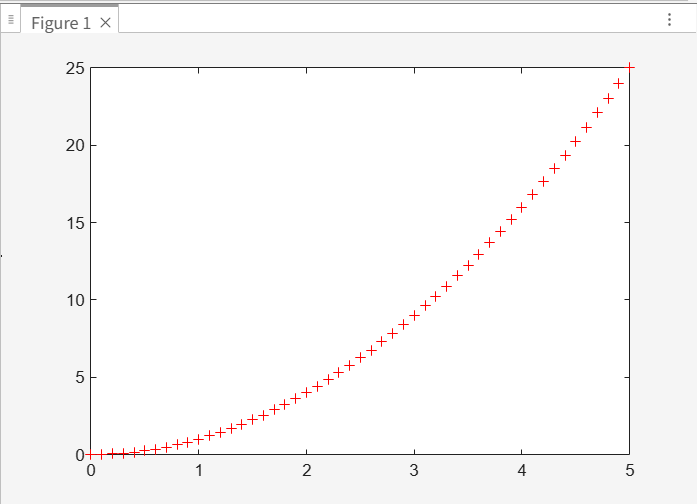
x=0:0.1:5;
y=x.^2;
plot(x,y,'r+')
title('my first plot')
xlabel('x_value')
ylabel('y_value')
grid on
hold
y2=x.^3;
y3=x.^4;
plot(x,y2,'g*')
plot(x,y3)
hold off
legend('plot1','plot2','plot3')
%% subplotting
subplot(311)
plot(x,y)
subplot(312)
plot(x,y2)
subplot(313)
plot(x,y3)
|
1
2
3
| function a=triangle_area(w,h)
a=0.5*w*h;
end
|